
Protect Yourself from Fraud & Scams
Fraud attempts are becoming increasingly sophisticated. Scammers may impersonate Citizens First Bank through phone calls, text messages, or even websites designed to closely resemble legitimate online banking.
Knowing the warning signs can help protect your personal information and your accounts. If something does not seem right, stop and contact Citizens First Bank directly at 608-637-3133.
SCAM ALERT: Fraudulent Calls & Text Messages
Citizens First Bank has received reports of scammers contacting customers while pretending to be representatives of the bank.
Scammers may claim there is suspicious or fraudulent activity on your account and then send a text message containing a link asking you to "confirm your identity." Scammers have also referenced the recent online and mobile banking upgrade in an attempt to make these conversations sound legitimate.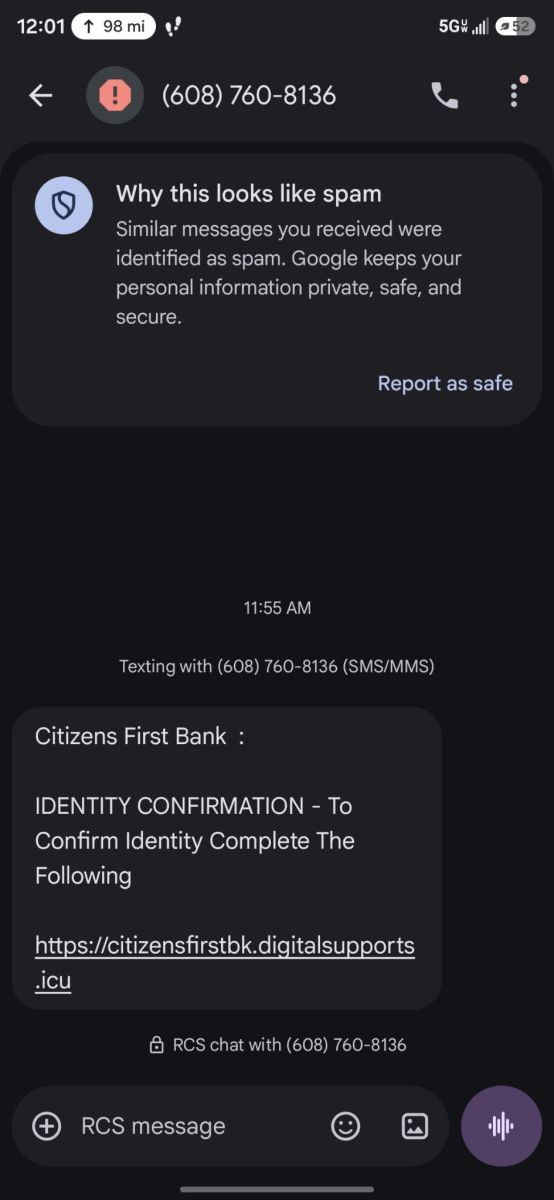
Remember:
- Do not click unexpected links asking you to verify your identity, account, or online banking information.
- Never share your online banking password, PIN, security codes, or other sensitive information with an unexpected caller.
- Do not rely on caller ID alone. Scammers can manipulate caller ID so a call appears to come from a legitimate business or familiar phone number.
- Hang up and call Citizens First Bank directly. If you are unsure whether a call is legitimate, end the conversation and contact your local branch using a trusted phone number.
If you receive a suspicious call or text, or believe you may have provided information to a scammer, contact Citizens First Bank immediately at 608-637-3133.
Beware of Fake Online Banking Websites
Scammers may also create fraudulent websites designed to look almost identical to the Citizens First Bank online banking login page.
A fraudulent website may copy the bank's logo, colors, login fields, and other design elements. The goal is to make the page appear legitimate so customers enter their User ID and password.
Always check the website address before entering your login information.
How to Spot the Fake Site
The fraudulent website resembles the legitimate Citizens First Bank login page, but there are important differences: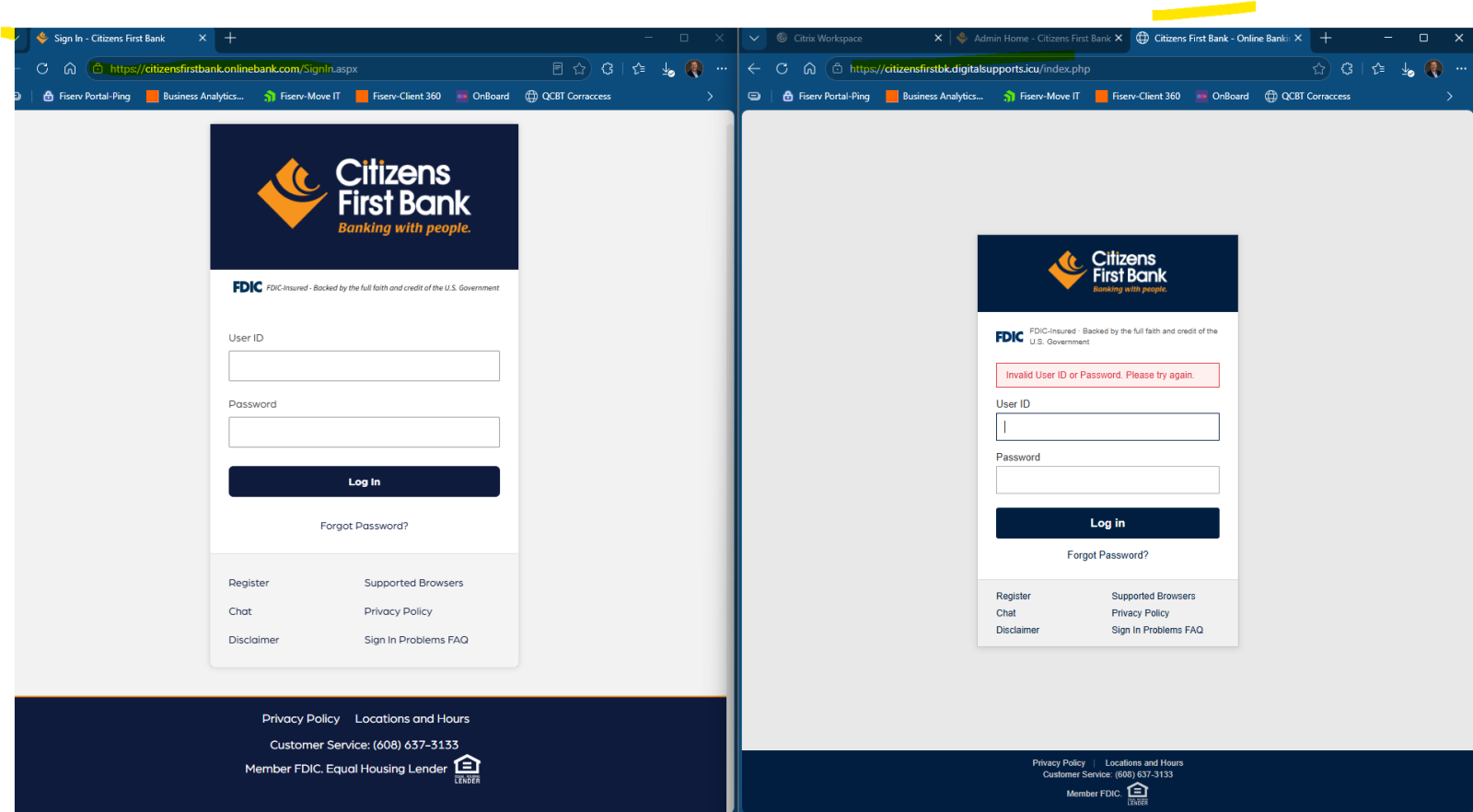
1. Check the URL
The legitimate and fraudulent websites have different addresses. In the example shown, the fake website's address ends in .php.
If you notice an unfamiliar website address or a URL ending in .php when attempting to access Citizens First Bank online banking, do not enter your login information.
2. Look closely at the Citizens First Bank branding
The fraudulent site may look convincing, but small branding details can be missing or incorrect. In this example, the orange chevron/diamond that normally appears near the Citizens First Bank name is missing from the browser's website identification area.
3. Watch for a false login error
On the fraudulent site, entering a User ID and password produces an error stating that the login information is incorrect.
That error does not necessarily mean the information was entered incorrectly. The fraudulent page may be designed to collect the credentials that were entered.
4. Check whether other links work
On the fraudulent version, links throughout the page, including footer links, may not work. The footer text may also appear smaller or slightly different from the legitimate site.
Small inconsistencies like these can be warning signs that you are not on the real Citizens First Bank website.
What Should I Do If I Entered Information on a Fake Website?
If you believe you entered your Citizens First Bank User ID, password, or other personal information on a fraudulent website:
- Stop using the website immediately.
- Change your online banking password immediately.
- Contact Citizens First Bank at 608-637-3133 so the bank can help you review the situation and determine whether additional steps are needed.
- Continue monitoring your accounts for activity you do not recognize.
Do not wait for suspicious activity to appear before contacting the bank.
An Extra Layer of Online Banking Security
Citizens First Bank's online and mobile banking platform provides an additional layer of security when a new device accesses your account.
A text message or email notification related to a new device login can help alert you to activity you may not recognize.
If you receive a notification about a login or device that you did not initiate, contact Citizens First Bank immediately.
Stop. Think. Verify.
Scammers often create a sense of urgency. You may be told that there is fraud on your account, that immediate action is required, or that you need to click a link before your account is restricted.
Do not let urgency pressure you into sharing information.
When in doubt:
- Don't click the link.
- Don't provide your password or security code.
- Don't trust caller ID alone.
- Check the website address carefully.
- End suspicious calls.
- Contact Citizens First Bank directly at 608-637-3133.
Think You May Have Been Targeted?
Whether you received a suspicious phone call, clicked a questionable link, visited a website that did not look right, or entered information into a site you now believe was fraudulent, contact Citizens First Bank as soon as possible.
Call Citizens First Bank at 608-637-3133.
Your account security matters. Staying alert and knowing what to look for can help protect your personal and financial information.